

Sometimes the best plan is a very simple one.
If you haven’t visited the site in a while, you may have noticed some redesign going on. Like redesign on any scale, it’s been a slow and stupid process, but thoroughly educational. The most important lessons were definitely not about coding. Let me walk you through the changes, and explain why I made certain choices. In doing so, I hope other artists and writers might avoid the same mistakes I made.
I created the first version of theragbox.com in June 2009, about 18 months ago. It was a very simple modification of the Comicpress 2.7 theme for WordPress. I didn’t change much more than the header image and font size. Then I posted a bunch of pages from my first book, and left it at that.
I’m not very good about updating this website. A simple look through the post dates will tell you that. Between day job, managing much of the Boston Comics Roundtable business and its website, and working on the publication of the actual Ragbox comic, I simply run out of time or ideas for new posts here. But I’d be a fool to ignore the marketing power of a website for any self-published book. So the goal should have been to create a site that was easy to update and adequately met my aesthetic tastes.
Easier said than done. I tend to dive into new projects with a true zeal, eager to educate myself on almost any topic. About 10 years ago, I’d learned the basics of HTML, but web design had advanced so far in the interim that redesigning a Comicpress site was like trying to start a jet engine by banging pieces of flint together. CSS and PHP were two perfect drugs or someone addicted to self-teaching, because there are thousands of books and websites dedicated to the subject. The more I researched, the deeper in I got, but was no closer to my goal. To redesign, I first to had figure out how to configure local hosting for dev, then learn the extremely complex organization of Comicpress, then the relationship between Comicpress 2.7 and 2.9, and their relationship to WordPress standards, and CSS, and PHP, and further and further and further. It was a remarkably efficient time-suck that was preventing me from the more important work of making comics.
Revised goals
When I reached my breaking point, I was probably further from a functional website than ever. So I took the crucial step of reassessing my goals – and how a website fit into those goals – and scaled back the project.
Comicpress 2.9 offered several out-of-the-box templates that I’d originally dismissed as too cookie-cutter, but I went back and took a second, more sober look. The new templates were far more flexible than the 2.7 templates, thanks to a host of pre-loaded widgets for customizing menus, sidebars, and other elements. I realized that with enough customizations, combined with some simple CSS tweaks, it would serve it purpose perfectly well.
The second thing I realized was actually an old lesson that I’d simply forgotten in the haze of self-educational fervor. Iterative design changes are more effective than massive roll-outs. They’re less disruptive to editorial workflow and they don’t confuse the reader as much.
Keeping info “above the fold”
I decided on two things that had to change in the old design: the header and the giant “latest comic” that appeared under the header. The original header image was ugly and cheap looking – something I whipped up myself and had intended to change later. In retrospect, I can see that the real problem was not even the amateurish rendering as much as the sheer size. It was pushing everything down the page.
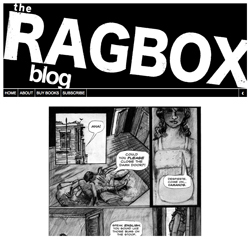
The old design had virtually no info above the fold.
The second problem was the gigantic size of the comic page. Comicpress, as you may know, has a tendency to favor horizontal comic formats, like daily strips, especially in the older 2.7 version. The latest comic would always appear on top, with blog posts and older comic pages listing beneath them. With my limited ability to redesign templates, whole-page comics like mine pushed everything so far down the page that you might never bother to scroll for more.
There’s a simple but essential practice in web design that seeks to keep things “above the fold.” It means that you want to give the reader all the essential information without them having to scroll down. It’s a term borrowed from newspapers, in which you keep the attention-grabbing headline on the top-half of the paper. In papers, if you don’t hook the reader at first glance, they won’t pick it up. In web design, if you don’t clearly convey what the site is and why they should care in a second or two, they’ll move on.
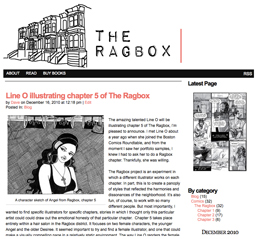
The new design shrinks the header and some inessential items, and moves the right-side nav up.
In the new design, I focused on moving info above the fold, which translates to about 600-700 pixels from the top of the browser window. Note how in the new design, you see a shorter, “airier” header image, a black spacer with some nav, and another set of nav tools on the right column to indicate that there’s lots more content elsewhere on the site. The latest comic page has been moved from the center to a smaller version on the right. For some comics, this might make the text illegible, but for me, the page will always be too big when viewed full-size, so I provide a preview that people can click on if they’re interested. The latest blog item now occupies the center column.
Is it a mind blowing redesign? No. It’s a simple redesign that made the necessary cosmetic changes so I could get on with my life. That’s the point. I spent a month learning my way around Comicpress, WordPress, and CSS, and learning is rarely wasted time. That will almost surely pay off later as I continue to make little tweaks on the site. But I should have stated my goal more clearly to myself in the beginning. If I want to write a comics script, I don’t reinvent the ballpoint pen. I find the best tools that suit my needs, and I get to work. Lesson learned.